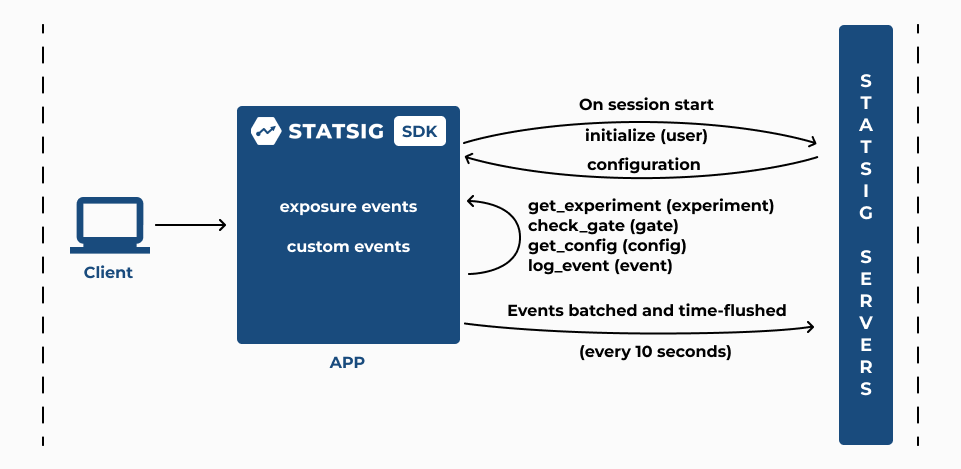
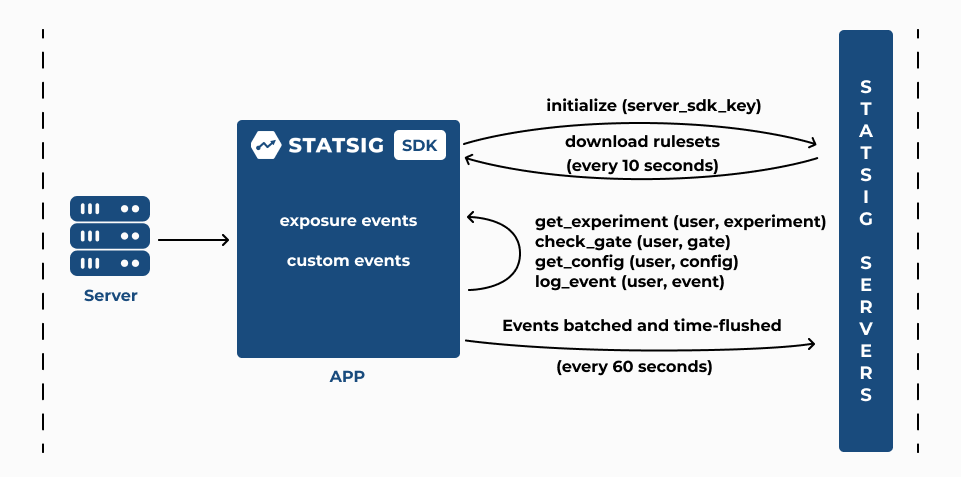
| Privacy | Your servers are presumed to be a secure, multi-user environment, so Server SDKs have access to the definition of all configurations in your project | All evaluations are precomputed on Statsig servers and sent down to you client applications. Names are obfuscated, but a savvy user may be able to glean information from the raw response |
| Evaluation Performance | Evaluations are done real-time, without a network request. Very complex configurations can take longer to compute, but in practice, this is rarely an issue. | As all evaluation is precomputed, gate and experiment checks are effectively a dictionary lookup with some computation used for creating and flushing exposure events |
| Initialization Performance | The SDK will make an upfront request for configuration files, then continually poll for any changes to your configurations, updating its internal state when a change is detected | Client SDKs download configurations when you initialize, before which, the SDK may not have usable values. The values aren’t updated mid-session unless you explicitly call updateUser. Additional options are available for performant initialization, see Initializing |
| Users | Server SDKs are designed to run against multiple users, and all SDK methods require a user object for evaluation/logging | Client SDKs are designed to be run with one user at a time. All evaluations are loaded once up front during initialization, and every event logged uses that user object |
| Infrastructure | Server SDKs require you to host your own backend services | Client SDKs run entirely on the client and utilize Statsig’s servers |